CashFlowCast — Know Your Checking Balance Before Bills Hit

See your money clearly.
Plan what comes next.

CashFlowCast is free to use. Forecast your cash flow, track goals and debt, test financial decisions, and see your net worth — all without connecting your bank.

🔒 No bank login | ✅ Free | 📅 5-yr forecast
English Español Português (Brasil) Français Italiano
Forecast Dark

Dark mode

Forecast Light

Light mode

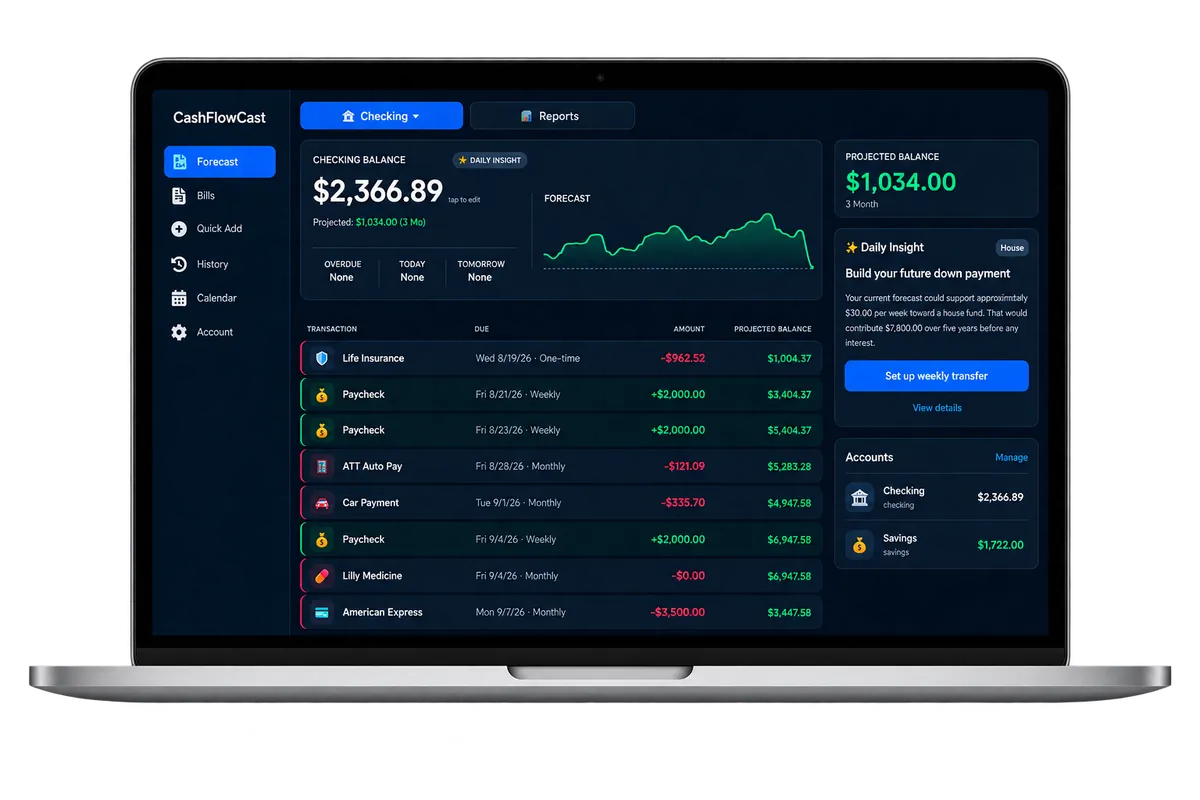
CashFlowCast desktop dashboard
More than a budget

Your financial picture in one place

Forecast what is coming, understand where your money goes, plan your goals, track debt, and see the bigger picture.

📊
5-Year Forecast
See your exact checking balance 3 months, 1 year, or 5 years from today based on your real bills and income.
🗂️
See Where Your Money Goes
Your spending is sorted automatically into categories like bills, subscriptions, and loans, with a clear breakdown for any month — no bank connection required.
Cash-Flow Insights
See what your forecast is telling you. CashFlowCast reviews your bills, income, and balances to surface useful guidance about your cash flow and saving capacity.
🔮
What If?
Test a purchase, extra payment, income change, or other financial decision before changing your real forecast. See the impact first, then decide.
🎯
Financial Goals
Create emergency, house, retirement, or custom goals. Track your progress and see your goals alongside the same forecast you use to plan your bills.
💳
Debt & Loans
Track mortgages, auto loans, credit cards, student loans, and more. See balances, APR, payments, progress, and estimated payoff dates.
🔗
Debt Payments in Forecast
Link a debt payment directly to your cash-flow forecast. When a linked payment is marked paid, CashFlowCast updates both your checking activity and the tracked debt.
📈
Net Worth
See your checking, savings, investments, and tracked debt together in one view. CashFlowCast automatically calculates assets minus liabilities.
📊
Reports
Review income, spending, and categories to understand where your money is going while your Forecast continues looking ahead.
📅
Calendar View
See every bill and paycheck on a monthly calendar. Tap any day to see what's due and your running balance.
📧
Daily Email Reminders
Get a morning and evening summary of what's overdue, due today, and due tomorrow — straight to your inbox.
Mark Bills Paid
Swipe left on any bill to mark it paid. Your balance updates instantly and it moves to your payment history.
📈
Balance Forecast Graph
See your balance trend at a glance. The chart shows exactly when big bills hit and how your balance recovers — tap and drag to explore any point in time.
📷
Scan a Receipt
Snap a photo of a receipt and CashFlowCast reads the store, date, and total, then fills them in for you. Check it over and save. Pro feature.
🔐
Two-Factor Security
Add an optional layer of protection with two-factor login. Get a one-time code by email when signing in on a new device, free and easy to enable in settings.
🔄
Recurring Payments
Set up weekly, biweekly, monthly, or yearly bills and income. CashFlowCast handles all the repeat scheduling.
💰
Savings Tracker
Set up automatic savings transfers. Pay them like a bill and watch your savings grow with a visual history graph — all tracked separately from your checking.
📱
Works Everywhere
Add to your home screen on iPhone or Android for a native app feel. Also works great on desktop.
📈
Portfolio Tracker
Track your stock positions alongside your cash flow. Add ticker, shares, and price paid — see live prices, gain/loss, and interactive sparkline charts.
🎨
Light & Dark Theme
Choose between the deep Ocean dark theme or the clean Slate Blue light theme. Your preference is saved automatically.
Quick Add
The + button in the nav lets you add a bill, income, or stock position instantly from anywhere in the app.
💸
Savings Forecast
See your projected savings balance 3 months, 1 year, 3 years, or 20 years out — based on your recurring transfers. Watch your wealth grow over time.
🎯
Projected Balance
Both checking and savings cards show your projected end balance for the selected period — so you always know where you'll be financially.
📬
Monthly Recap Email
Get a summary on the 1st of every month showing what you paid, how much you saved, and your financial highlights from the previous month.
📳
Haptic Feedback
Feel a subtle tap when you pay a bill, switch tabs, or interact with the app — making CashFlowCast feel like a native app on iOS and Android.
☁️
Synced Preferences
Your theme, haptic, and notification settings are saved to the cloud so your preferences follow you across all your devices automatically.

Up and running in minutes

1
Enter your balance
Tap the balance card and type in your current checking account balance.
2
Add bills & income
Add your recurring bills, one-time expenses, and paychecks with amounts and due dates.
3
See your future
Instantly see your projected balance for any date up to 5 years out. No surprises.
4
Stay on track
Get daily email summaries and mark bills paid as you go. Your forecast stays accurate.
Simple pricing

Free to use. Always.

The core app is completely free. Unlock email notifications with a subscription.

Free Forever
$0
no credit card needed
  • Full cash flow forecast
  • Up to 5-year projections
  • Bills & income tracking
  • Checking, savings & portfolio tracking
  • Cash-Flow Insights
  • What If financial simulator
  • Financial goal tracking
  • Debt & loan tracking
  • Net worth dashboard
  • Reports & spending categories
  • Calendar & payment history
  • Desktop & mobile dashboards
  • No bank login required
Get Started Free
Pro
$14.95
per year — less than $1.25/month
  • Everything in Free
  • Daily email bill reminders
  • Morning & evening summaries
  • Monthly recap emails
  • Receipt scanning — snap a photo, auto-fill
  • 30-day free trial
Start Free Trial

30-day free trial · Cancel anytime

Already happy with the free features? You can still subscribe to support continued CashFlowCast development.

Got questions?

Frequently asked questions

What is CashFlowCast? +

CashFlowCast is a personal finance app that forecasts your checking account balance based on your bills and income. It shows you exactly how much money you will have days, weeks, months, or up to 5 years into the future — so you can plan ahead and avoid overdrafts.

Does CashFlowCast use AI? +

Only for receipt scanning, a Pro feature. When you photograph a receipt, the image is sent to our AI provider to read the store name, date, and total. The photo is not saved — it is read once and discarded, and we never store it on our servers. You always review the values before saving. Nothing else in CashFlowCast uses AI: your bills, income, and balance are entered by you, and the app never connects to your bank.

Does CashFlowCast connect to my bank? +

No. CashFlowCast does not connect to any bank. You manually enter your bills, income, and current balance. Your banking credentials are never at risk. Your forecast is based entirely on data you control.

Is my account secure? Does it have two-factor authentication? +

Yes. CashFlowCast offers optional two-factor login for extra security. When enabled, you receive a one-time code by email when signing in on a new device. Trusted devices are remembered for 30 days, so you are not prompted on every login. It is free and can be turned on in settings.

How far into the future can it forecast? +

CashFlowCast can forecast your balance up to 5 years into the future. Switch between 3-month, 1-year, and 5-year views with one tap.

What devices does it work on? +

CashFlowCast works on iPhone, Android, and desktop browsers. Add it to your home screen for a native app experience — no App Store download required.

How do the daily email reminders work? +

You get two emails per day — a morning reminder and an evening summary. Each shows your current balance, what is overdue, what is due today, and what is due tomorrow.

How is this different from a budgeting app? +

Budgeting apps track what you have already spent. CashFlowCast forecasts what you will have. Instead of looking backward at transactions, CashFlowCast looks forward so you can see exactly when your balance will be low — before it happens.

Does CashFlowCast have a savings tracker? +

Yes! CashFlowCast has a built-in Savings Account tracker. Create a savings transfer bill, assign it to your Savings account, and when you mark it paid the amount automatically moves to your savings balance. You get a visual growth graph and full deposit history — all separate from your checking forecast.

Does CashFlowCast have a stock portfolio tracker? +

Yes! CashFlowCast includes a built-in Portfolio Tracker. Add your stock positions — ticker symbol, shares, and price paid — and see live prices and gain/loss updated automatically. Each stock shows an interactive 30-day sparkline chart with date tooltips. Your positions sync across all your devices.

Does CashFlowCast have a light theme? +

Yes! CashFlowCast offers both a dark Ocean theme and a clean Slate Blue light theme. Toggle between them anytime from the Account tab — your preference is saved automatically.

Can CashFlowCast forecast my savings growth? +

Yes! The Savings tab includes a forecast sparkline that projects your savings balance up to 20 years into the future based on your recurring transfer schedule. Switch between 3-month, 1-year, 3-year, and 20-year views to see how your savings will grow over time.

What is the projected balance shown on the card? +

Both your checking and savings cards show a projected end balance for the period you have selected. For example, if you have 3 months selected, it shows exactly where your balance will be in 3 months — accounting for every bill, paycheck, and transfer in between.

Does CashFlowCast send a monthly summary? +

Yes! On the 1st of every month, CashFlowCast sends a Monthly Recap email showing everything you paid last month, how much you saved, and a summary of your financial activity. You can toggle this on or off in the Bills tab settings.

Does CashFlowCast support haptic feedback? +

Yes! When installed as a PWA on iOS or Android, CashFlowCast supports haptic feedback — a subtle tap when you pay a bill, switch tabs, or select a period. You can toggle haptics on or off in the Bills tab settings.

Can I cancel anytime? +

Yes. Cancel anytime from the Account section or by emailing support@cashflowcast.com. No questions asked.

How is CashFlowCast different from YNAB? +

YNAB focuses on envelope budgeting — telling you where to put money you already have. CashFlowCast focuses on forecasting — showing you exactly what your bank balance will be days, weeks, and years from now. CashFlowCast is completely free with no bank login required, while YNAB costs around $109/year and requires linking your bank account.

Is CashFlowCast a free alternative to YNAB? +

Yes. CashFlowCast is completely free with no credit card required. Unlike YNAB which costs $109/year, CashFlowCast core forecasting is always free. An optional subscription ($14.95/year) unlocks daily email reminders and monthly recaps. No bank login ever required.

What languages does CashFlowCast support? +

CashFlowCast is available in English, Spanish (Español), Brazilian Portuguese (Português do Brasil), French (Français), and Italian (Italiano). You can change your language anytime from your Account settings.

Stop guessing.
Start knowing.

Join thousands of people who know exactly where their money is going.

Get Started →